How to Connect Go-E EV Chargers with the Zerofy App
Supported Devices
| Model | Serial Number Range |
|---|---|
| Gemini 2.0 | 400000+ |
| Gemini | 200000 – 399999 |
| Home | 050000 – 199999 |
Preconditions:
- Ensure your Go-E EV Charger is online and functional.
- Set up an account on the Go-E app.
- Your go-eCharger must be running firmware version 052 or higher. The Go-E app version 2.3 or higher is required to enable the API.
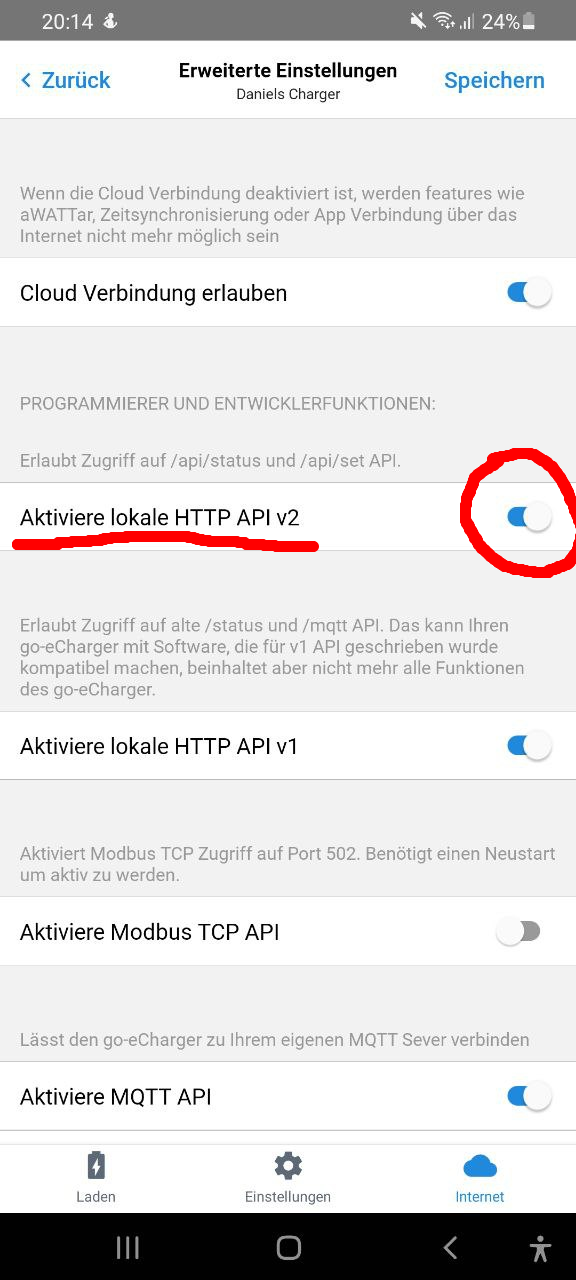
- The Cloud HTTP API must be enabled. In the Go-E app, go to Internet → Advanced Settings and activate the Cloud HTTP API.
Connecting Your Go-E EV Charger with Zerofy
- The Cloud HTTP API must first be activated in the app. The setting can be found in the app under Internet / Advanced Settings.
- An access token is required to access the HTTP API. This token is displayed in the app under Internet / Advanced Settings.
- To connect your Go-E charger in Zerofy , enter the serial number and the API token in the field.
Features and Things to Know
With Go-E integration, you can:
- Benefit from smart charging features within Zerofy ‘s ecosystem, for example charge on excess solar with Autopilot (Solar Mode).
- Remotely manage your EV charging.