How to Connect SAJ Solar Inverters with the Zerofy App
Preconditions
- Ensure your SAJ inverter is connected to the internet via the SAJ monitoring system.
- Register and set up your account on the eSAJ Home platform or Elekeeper app.
Connecting Your SAJ Inverter with Zerofy
-
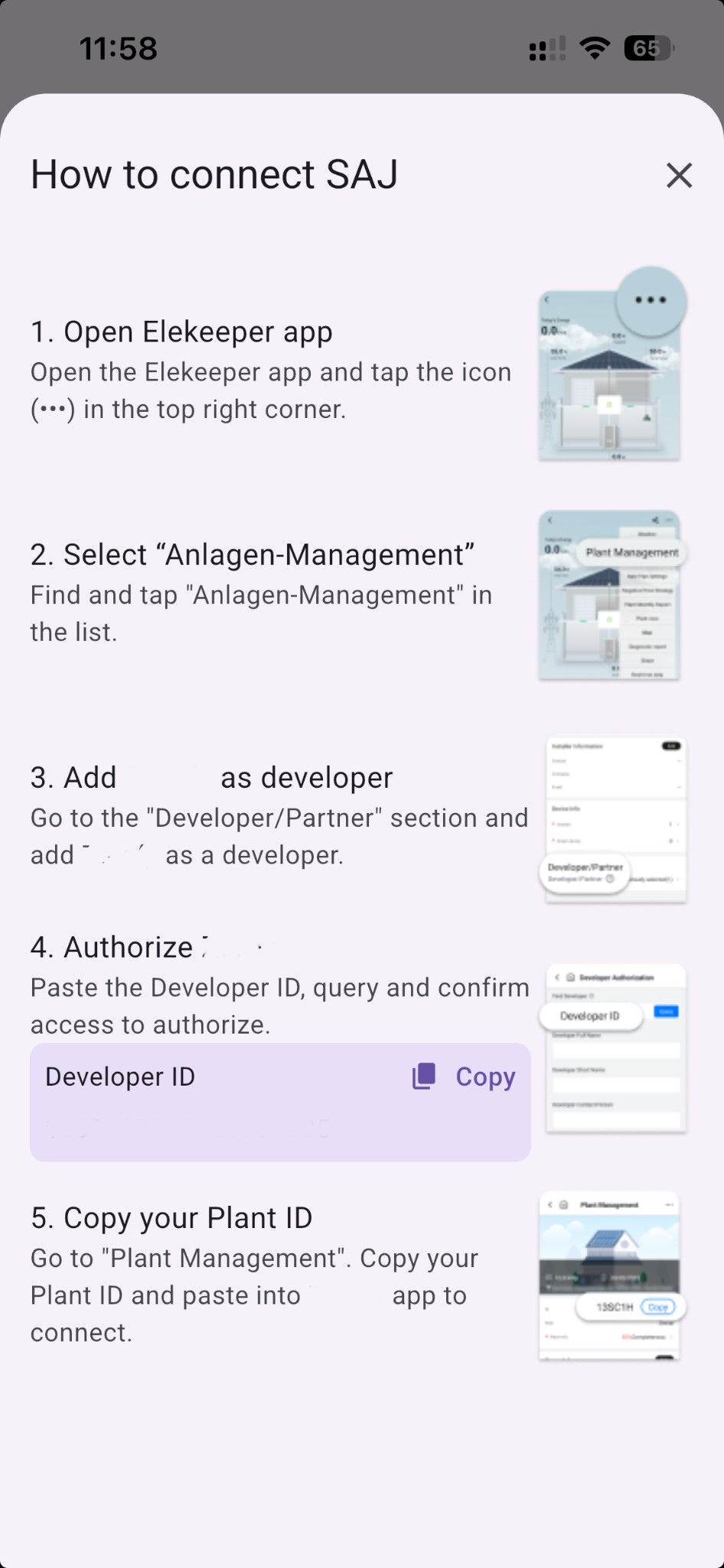
Open Elekeeper app – Open the Elekeeper app and tap the icon (•••) in the top right corner.
-
Select “Plant Management” – Find and tap “Plant Management” in the list.
-
Add Zerofy as developer – Go to the “Developer/Partner” section and add Zerofy as a developer.
-
Authorize Zerofy – Paste the Developer ID (shown in Zerofy), query and confirm access to authorize.
-
Copy your Plant ID – Go to “Plant Management”. Copy your Plant ID and paste it into Zerofy to connect.
Features and Things to Know
Once connected, you can:
- Monitor real-time and historical energy production.
- View live solar generation data with 5-minute resolution.
- Track battery status and energy flow (if applicable).
- Switch devices on excess solar production with Autopilot (Solar Mode).
Data synchronization depends on SAJ’s cloud update frequency.
Meter type
Main meter: Grid meter. Can be configured as bi-directional or consumption.Production: Measures solar production. Configure as sub meter with typeproduction.Sub meter: Measures any type of device as a sub meter and appears in device consumption.
For full setup details with screenshots, see System Setup: Meter Configuration.